CapsCode
Hello Devs,
In this blog I will guide you all through "HOW WE CAN STYLE CONSOLE.LOG() USING CSS".
I have made 12 different styles for you to make sure that you will not ended up with any confusions.
So without wasting any time lets get into this tutorial.
- Add
%cbefore the text you want to style. - Insert one more argument in the console log function with the style you want to apply.
Examples:
1.Simple Console Log Shortcut for JS Objects with the defined color i.e #007acc
jsconsole.log("%cThis is my 1st style", "color: #007acc;", "CAPSCODE");
output:

2.JSON String Output
jsconsole.log(
"%cThis is my 2nd style",
"color: #007acc;",
JSON.stringify({ fname: "JOHN", lname: "DOE" }, null, "\t")
);
output:

3.Simple Console Log Shortcut for JS Objects - Green Text
jsconsole.log("%cThis is my 4th style", "color: #26bfa5;", foo);
output:

4.Simple Console Log Shortcut for JS Objects - Blue Background
jsconsole.log(
"%cThis is my 5th style",
"color: white; background-color: #007acc;",
foo
);
output:

5.Simple Console Log Shortcut for JS Objects - Green Background
jsconsole.log(
"%cThis is my 6th style",
"color: white; background-color: #26bfa5;",
foo
);
output:

6.Console logs -> Hello ${TM_FILENAME} line:${TM_LINE_NUMBER} on Green Background
jsconsole.log(
"%cThis is my 7th style",
"background: green; color: white; display: block;"
);
output:

7.Find errors with style
jsconsole.log(
"%cThis is my 8th style",
"color: red; display: block; width: 100%;",
error
);
output:

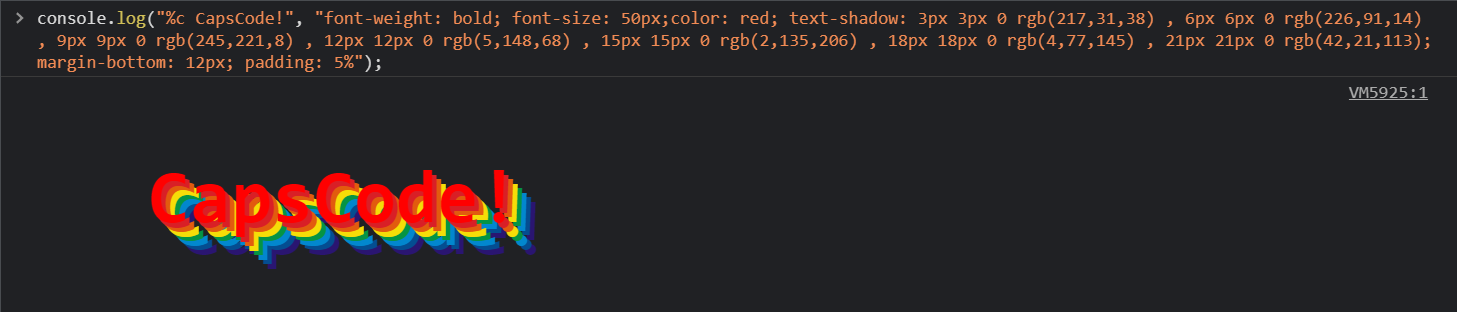
8.You need a Rainbow in your code
jsconsole.log(
"%c CapsCode!",
"font-weight: bold; font-size: 50px;color: red; text-shadow: 3px 3px 0 rgb(217,31,38) , 6px 6px 0 rgb(226,91,14) , 9px 9px 0 rgb(245,221,8) , 12px 12px 0 rgb(5,148,68) , 15px 15px 0 rgb(2,135,206) , 18px 18px 0 rgb(4,77,145) , 21px 21px 0 rgb(42,21,113); margin-bottom: 12px; padding: 5%"
);
output:
9.Confused?! so put a this guy in your code.
jsconsole.log(
"%c ",
"font-size: 1px; padding: 166.5px 250px; background-size: 500px 333px; background: no-repeat url(https://www.capscode.in/static/media/cap.0d0af8f0.png);"
);
output:
10.Simple Console Log Shorcut for JS Objects - Green Text
jsconsole.log(
"%c ",
"font-size: 1px; padding: 240px 123.5px; background-size: 247px 480px; background: no-repeat url(https://www.capscode.in/static/media/cap.0d0af8f0.png);"
);
output:
11.Celebrate your code works!
jsconsole.log(
"%c ",
"font-size: 1px; padding: 125px 125px; background-size: 250px 250px; background: no-repeat url(https://i2.wp.com/i.giphy.com/media/12BYUePgtn7sis/giphy-downsized.gif?w=770&ssl=1);"
);
output:
12.Coding GIF
jsconsole.log(
"%c ",
"font-size: 1px; padding: 215px 385px; background-size: 770px 430px; background: no-repeat url(https://i0.wp.com/i.giphy.com/media/ZVik7pBtu9dNS/giphy-downsized.gif?w=770&ssl=1);"
);
output:
That all in this article, hope you all have enjoyed it.